Captain Ratatype

What are the tactile bumps and what are they for
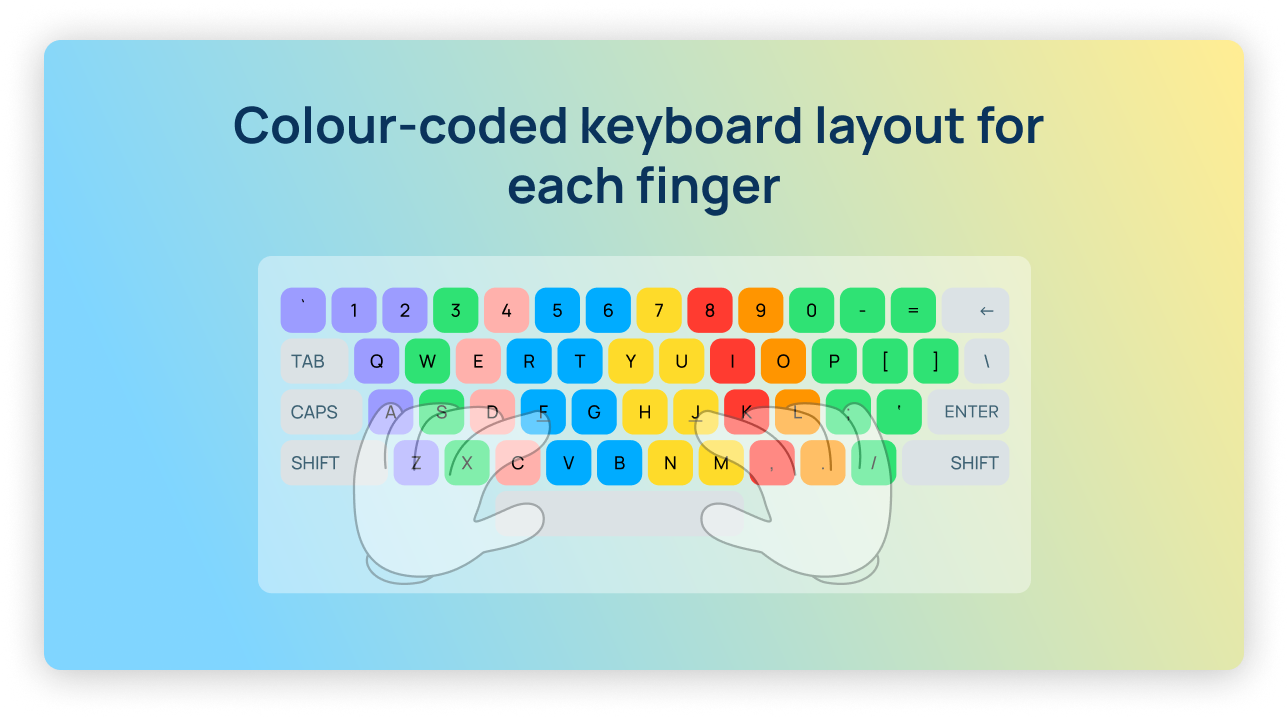
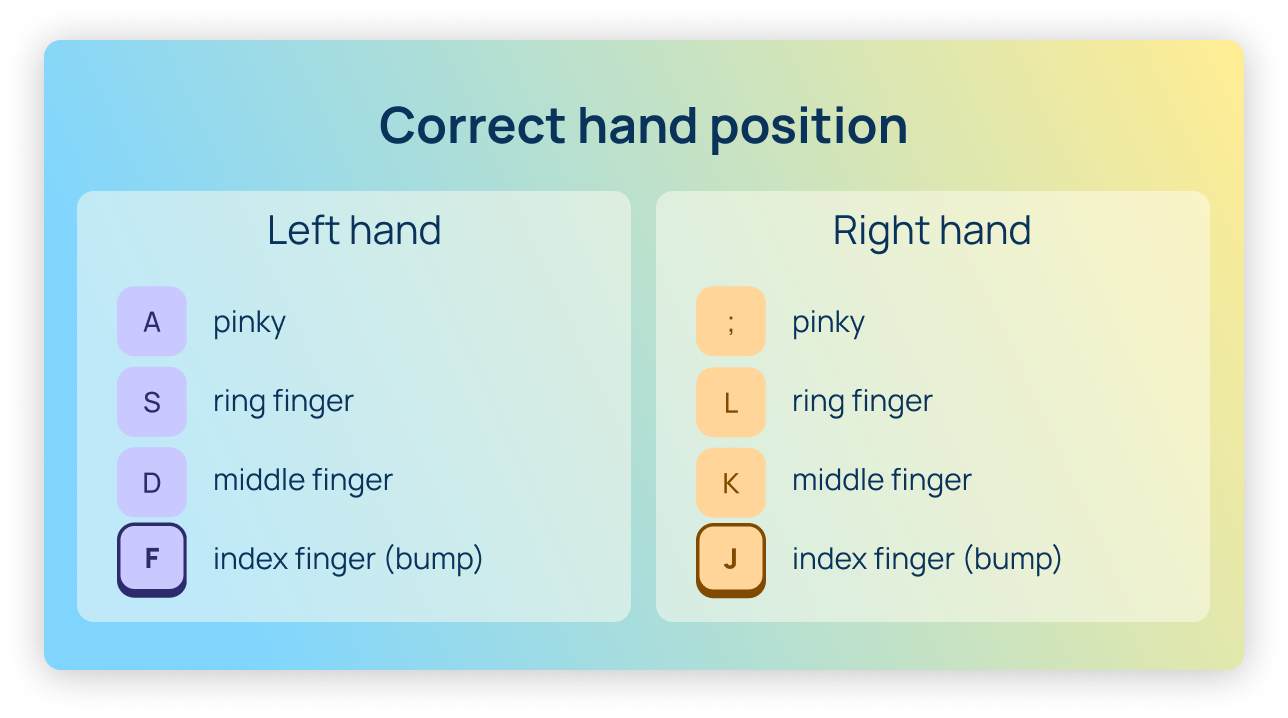
The official name for these bumps is tactile home position indicators. They mark the F and J keys as "home" points for the index fingers of the left and right hands respectively. Together with the rest of the home row keys — A, S, D, F for the left hand and J, K, L, ; for the right — they form the home row: the base position from which all movement begins while typing.
The idea is simple: if your fingers always know where "home" is, your eyes can stay on the screen instead of the keyboard. This is the foundation of touch typing — a technique that allows you to significantly increase your typing speed and reduce errors.
When you lift your hands from the keyboard — to grab a cup of coffee, scratch your nose, or adjust your glasses — and return, your fingers don't search for the right position with their eyes. They simply feel the bumps on F and J and automatically settle into the correct position. This reflex develops fairly quickly and eventually becomes entirely unconscious.
Index fingers are the strongest and most agile. That's precisely why the reference points were placed on F and J: from them, it's equally convenient to reach most frequently used letters.

How the correct hand position works and why it speeds up typing
In touch typing, each finger is responsible for its own zone of the keyboard. The left pinky — the A key, ring finger — S, middle finger — D, index finger — F and G. The right index finger — J and H, middle finger — K, ring finger — L, pinky — semicolon and the rest of the right side. Both thumbs are responsible for the space bar.
This division is not accidental. It minimizes the distance fingers travel during typing and evenly distributes the workload across all ten fingers. A person who types correctly from the home position makes far fewer unnecessary movements than someone who hunts for keys with two or three fingers using the "hunt and peck" method.
The results in numbers: the average two-finger typing speed is 27–40 words per minute. An experienced user who has mastered touch typing with correct hand position comfortably types 70–90 words per minute, with some reaching 120 or more. The difference is several times over, and it comes down to the fact that fingers know where they are without involving sight.
Watch our video guide to fast typing.
The Origin of the QWERTY Layout: The Full Story
To understand why the keyboard looks the way it does rather than some other way, we need to go back to the 1860s. At that time, "fast typing" meant something entirely different — mechanical hammers, ink, and paper tape.
1868 — The First Commercial Typewriter
Christopher Latham Sholes, an American journalist and inventor, together with his partner Carlos Glidden, received a patent for a typewriter. Early versions had keys arranged either alphabetically or randomly — depending on the design. The machine already existed, but a convenient keyboard was still a long way off.
The main problem with early typewriters lay in the mechanics: each key was connected to a metal hammer that struck an ink ribbon and left a mark on paper. If the typist (and most operators were women at the time) pressed adjacent keys too quickly, the hammers would collide and jam the entire mechanism. This was a real disaster when working with documents.
1873 — The Birth of QWERTY
Sholes spent several years redesigning the layout. His logic was as follows: if letters that frequently appear side by side in English words were placed far apart on the keyboard, the hammers would have time to return to their position between strikes. He analyzed the frequency of letter combinations in English and separated "dangerous pairs" to different hands or different zones of the keyboard.
This is how the layout we know today came to be. The first row — Q W E R T Y U I O P — gave it its name. The layout wasn't perfect from an ergonomic standpoint, but it solved the main problem of the time: mechanical jamming.
1878 — Remington Mass-Produces QWERTY
Sholes sold the rights to his typewriter to the Remington company — yes, the same one that made rifles. After the end of the Civil War, Remington was looking to repurpose its manufacturing capacity and bet on typewriters. The company invested heavily in marketing and production, and QWERTY began its triumphant spread across America and then the world.
The network effect took hold: the more people learned to type on QWERTY, the greater the demand for those machines. The more QWERTY machines were sold, the more schools and courses taught that very layout. Stopping this flywheel became virtually impossible.
The Myth of Deliberate Inconvenience
There is a popular tale that Sholes deliberately made QWERTY uncomfortable to slow typists down and prevent jamming. This is an exaggeration. First, Sholes was not trying to slow anyone down — he was trying to solve a real engineering problem. Second, by the standards of his time, QWERTY was a perfectly reasonable solution: it distributed the work between two hands and reduced the number of jams.
The problem is that the mechanical logic of the 1870s makes no sense for an electronic keyboard of the 2020s. There are no more hammers. But QWERTY remained.
1936 — Dvorak Proposes a Better Option
August Dvorak, an American psychologist and educator, conducted extensive research into finger movements during typing and developed an alternative layout — the Dvorak Simplified Keyboard. He placed the most common vowels (A O E U I) on the home row of the left hand, and the most common consonants (D H T N S) on the home row of the right. The result: when typing on Dvorak, fingers travel approximately half the distance compared to QWERTY.
Dvorak received a patent, conducted studies, and proved the advantages of his layout. And he lost. Not because his layout was worse, but because by 1936 QWERTY had already taught several generations of people. Retraining everyone would have been too costly and painful.
Today: QWERTY Forever?
Modern alternatives to QWERTY — Dvorak, Colemak, Workman, Bépo for French — are genuinely more ergonomic by objective measures. But research shows: an experienced QWERTY typist who switches to Dvorak gains only a few percent in speed after several months of retraining. For most people, the difference is not worth the effort.
QWERTY remains the standard due to what economists call path dependence. A decision made in 1873 for the sake of mechanical hammers still determines how billions of people interact with computers, smartphones, and tablets.
How the Bumps on F and J Help You Learn to Type Fast
Let's return to the bumps. If you want to increase your typing speed — whether for work or to keep up with your own thoughts while writing — the tactile bumps on F and J become your first point of reference.
Close your eyes, lift your hands from the keyboard, and bring them back. Find F and J by touch alone — no peeking. This is the beginning of the muscle memory that will, over time, turn the keyboard into a natural extension of your hands.
The first week of touch typing practice is the hardest. Speed drops, fingers get confused, and the temptation to look down arises. But it is precisely in this moment that the bumps on F and J do their most important work: they give your fingers a point of reference.
If you want to check your current typing speed or start learning the touch method — the Ratatype trainer will help you do it step by step, from scratch, for free. Start with the home row: place your fingers on A S D F and J K L ;, feel the bumps on F and J — and off you go.
Reference list
- hagley.org
- britannica.com
- wikipedia.org
- hackaday.com